




| Price | RM1,399.00 RM1,699.00 RM |
| Product SKU | DT-VIGOR-2860N |
| Brand | Draytek |
| Size (L x W x H) | 36 cm x 9 cm x 30 cm |
| Availability | |


- Fail-over and Load Balancing with a second WAN through a Gigabit Ethernet WAN port
- Object-based SPI Firewall and CSM (Content Security Management) for network security
- 2 USB ports for 3G/4G mobile, FTP server and network printers
- 32 VPN tunnels with comprehensive secure protocols
- VLAN for secure and efficient workgroup management
- Support Smart Monitor Traffic Analyzer (30-nodes)
- The Central AP Management facilitates multiple-deployment of Vigor access points
- The Central VPN Management (CVM) lets your remote offices and main offices easily be connected with VPN
- The Vigor 2860n series can be remotely managed by TR-069 VigorACS SI Central Management
|
Capable of routing and load balancing almost any WAN source you connect to it, this router brings versatility to your business The Draytek Vigor 2860n is among the most versatile business routers we've ever reviewed. It's capable of balancing or switching between up to three different WAN connections. A built-in modem supports ADSL and VDSL internet connections, including Fibre-To-The-Cabinet connections such as BT Infinity, while a dedicated 10/100/1000 port allows you to plug in a second WAN connection. Finally, you can connect a 3G or 4G mobile internet dongle to one of the router’s USB ports. |
|
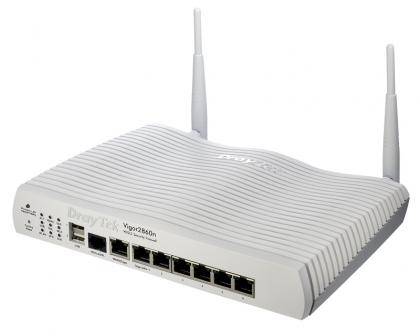
All the router's ports and indicator lights are on the front, with only a pair of replaceable Wi-Fi antennas, the power connector and a power switch at the back. There are two USB ports, an RJ11 port for your ADSL or VDSL connection, a Gigabit Ethernet WAN port and six Gigabit Ethernet ports for your local network. To the right of the ports is a panel of lights showing you the status of various features, including the WAN connections, VPN and wireless network. There’s also a factory reset button and a button to enable and disable your wireless network, as well as a WPS button for quickly connecting compatible devices. |
|
Network administrators will be pleased to know that you don't have to be at the router to see its status lights and connected ports. The main page of Draytek's web-based admin interface is crowned by an image showing these with colour-coding to indicate which ports are connected and in use. The Vigor 2860n’s web interface is packed with options, but fortunately there's a quick-start wizard that helps you configure it. |
|
The Vigor 2850n can provide up to four wireless networks, and you can easily create a Guest network so that visitors or staff can get online without having unrestricted access to other directories and devices shared on your network. Each wireless SSID can be configured to "isolate member", which means that devices connected to it won't be able to see either each other or anything else on the network. There's also an "isolate VPN" option, which prevents users on the SSID communicating with users who've connected to the network via a VPN. The router's NAT settings make it easy to open and forward ports, which you’ll need to do if your users ever need to access an online service or make a web or FTP server available outside your local network. The firewall menu includes simple content filtering based on your own blacklists of URLS and general keywords, and the ability to create APP Enforcement Profiles. These can block certain kinds of internet traffic, such as games, instant messaging or P2P file sharing services. |


LAN Ports (Switch)
|
WAN Ports
|
Performance
|
ADSL Compatibility
|
VDSL Compatibility
|
Load Balance/Failover Features
|
Vigor 2860 ATM Protocols (DSL)
|
Wireless LAN Features ('n' Models Only)
|
Firewall & Security Features
|
Bandwidth Management
|
Network/Router Management
|
VPN Facilities
|
Network Features
|
Routing Protocols
|
Operating Requirements
|
- DrayTek Vigor 2860n Router
- Quick Start Guide
- Power Adaptor
- Ethernet Cable
- Detachable Antennas (Wireless models)


original sony laptop, delivery was relatively quick. strong recommend to buy.


safely received, no broken part even with bubble wrap around the item. thx for selling.


商品和描述的一致。包装很好。 配合卖家提供的优惠价卷,价格变得更优惠。

fast delivery, good services and prompt reply!